OpenAI published “Running Codex safely at OpenAI” on May 8, 2026. The useful part is not simply that Codex can write and run code. The useful part is the operating model around it: sandboxing, approval gates, network policies, configuration management, and detailed telemetry that is aware of agent activity.
That matters because coding agents are no longer only autocomplete tools. Once an agent can inspect a repository, edit files, run commands, use tools, and react to failures, teams need to design the boundary around the work. The core question changes from “Can the model produce code?” to “Can the work be constrained, observed, reviewed, and rolled back?”
What Actually Changed
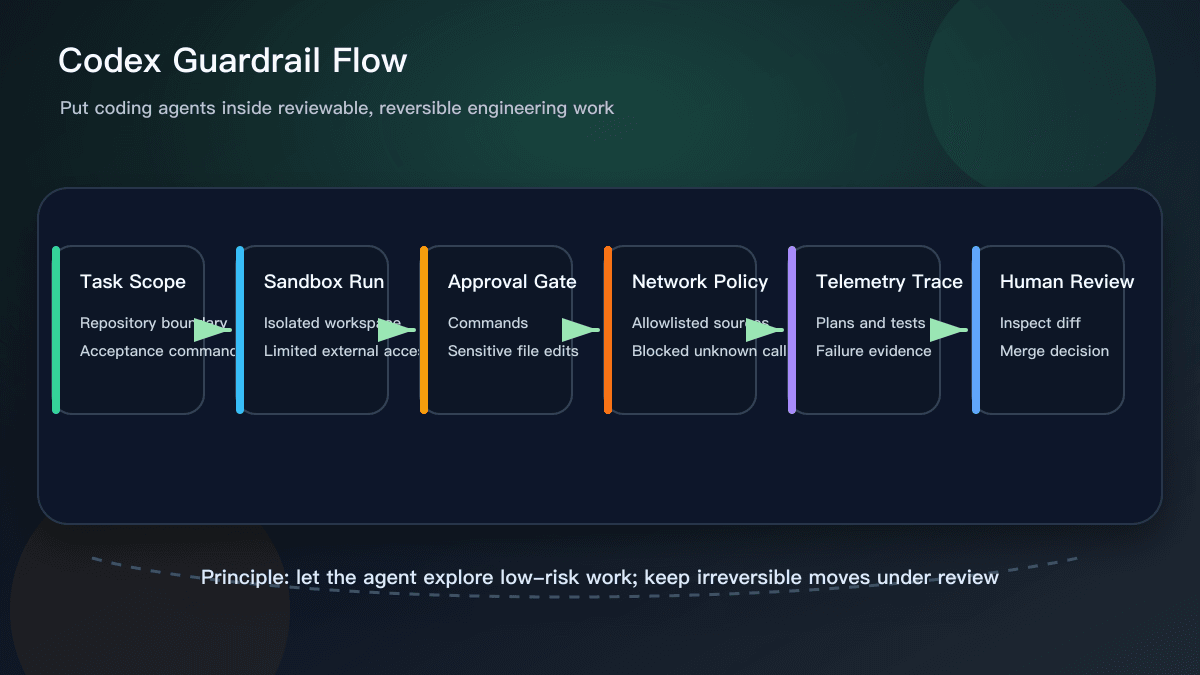
Most teams compare Cursor, GitHub Copilot, or ChatGPT by looking at output quality. That is reasonable, but it misses the bigger adoption problem. OpenAI’s post points to a control layer: where the agent executes, which actions require approval, how network access is limited, and how tool calls and failed results are recorded.
The lesson is that a good coding-agent task should not be just “fix this bug.” It should include a repository boundary, files that are off limits, acceptance commands, network constraints, and explicit human approval points. The agent can explore low-risk alternatives, but changes touching production configuration, credentials, payment flows, authorization, data deletion, or migrations need a gate.
Why This Helps Everyday Teams
The practical value of this update is that “safe coding agents” becomes a set of engineering moves, not a slogan. Sandboxes separate trial work from the real environment. Approvals return irreversible moves to a person. Network policy reduces free movement across unknown sources. Telemetry makes it possible to inspect what happened during a task, including tool activity, command results, and policy blocks.
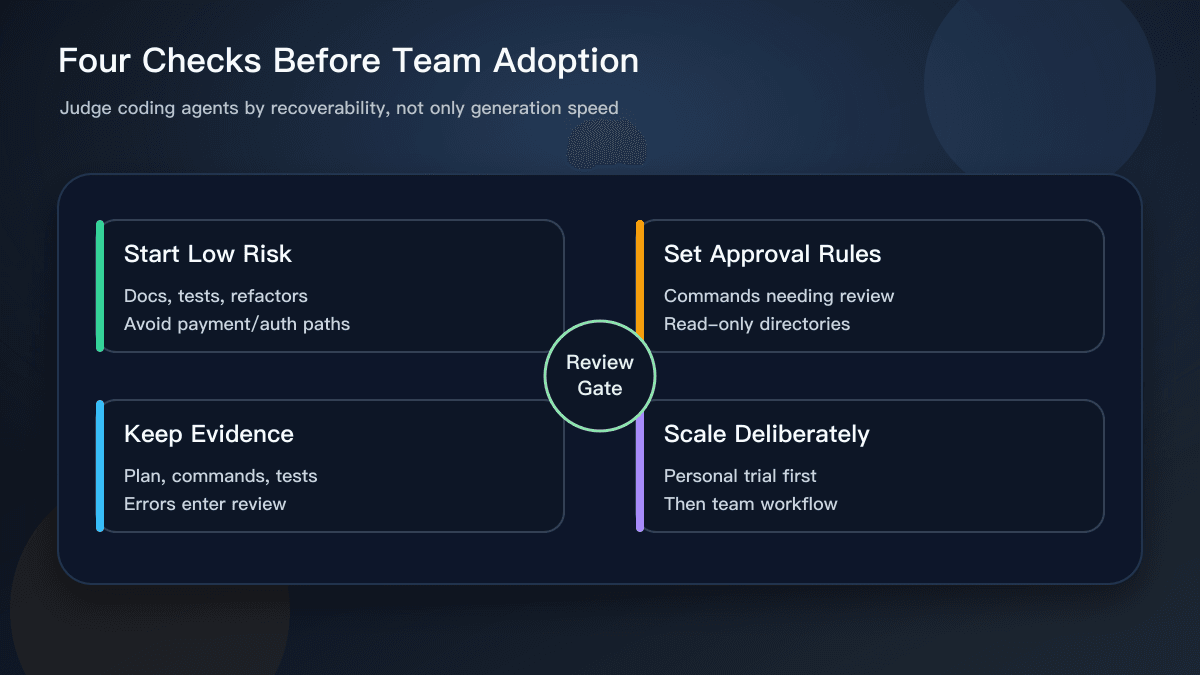
Solo developers can still use the pattern in a lightweight way. Before asking an assistant to edit code, define the files it may touch. Before letting it run a command, ask it to explain why. After the edit, require fresh test output. Before merge, inspect the diff. You do not need a full platform on day one; you do need evidence for the agent’s work.
Small teams should start with low-risk tasks: documentation updates, test generation, type cleanups, small refactors, and page-level UI fixes. Watch how the agent fails in those areas before expanding to core business logic. A team that has not learned the failure modes should not begin with payment, permission, or destructive data workflows.
How It Relates to Cursor and Copilot
This does not make Cursor or Copilot obsolete. It clarifies where they fit. Cursor is still strong for project-level context and multi-file editing. Copilot remains useful for low-friction suggestions inside the editor. ChatGPT is helpful for explaining, planning, and producing review checklists. The Codex safety write-up adds the missing layer: whatever tool you use, the team needs an operating model for agent work.
When evaluating a coding tool, ask sharper questions. Can it respect a file boundary? Can it explain command intent before execution? Can it report tests, failures, and rollback paths clearly? Can it fit into your branch, review, and local verification flow? If a tool is excellent at producing code but poor at exposing the path it took, the maintenance cost will appear later.
What to Do Next
A useful next step is to create a coding-agent task template. Include the goal, allowed files, prohibited files, acceptance commands, and actions that require human approval. Use that template for every agent task instead of relying on one-off chat instructions.
Second, record failures. Do not keep only successful diffs. Track what commands the agent ran, where it failed, and why work was rolled back. OpenAI’s emphasis on agent-aware telemetry is a reminder that an AI agent is not a normal script. The path it took is part of the artifact.
Third, move verification earlier. Every AI-assisted change should name the command that proves it works, such as npm test, npm run build, or the equivalent for the stack. The agent can suggest a command, but the team should confirm it actually ran and that the result covers the original request. For engineering teams, that evidence is more valuable than an impressive explanation.
Why This Was Worth Covering
This is a strong daily-hotspot topic because it is official, recent, and directly relevant to AI coding workflows. It also turns into durable advice for readers: judge coding agents not only by intelligence, but by the controls, evidence, and review path around their work.
Sources:
- OpenAI: Running Codex safely at OpenAI https://openai.com/index/running-codex-safely/
- OpenAI Security news page https://openai.com/news/security/